Course Project Progress
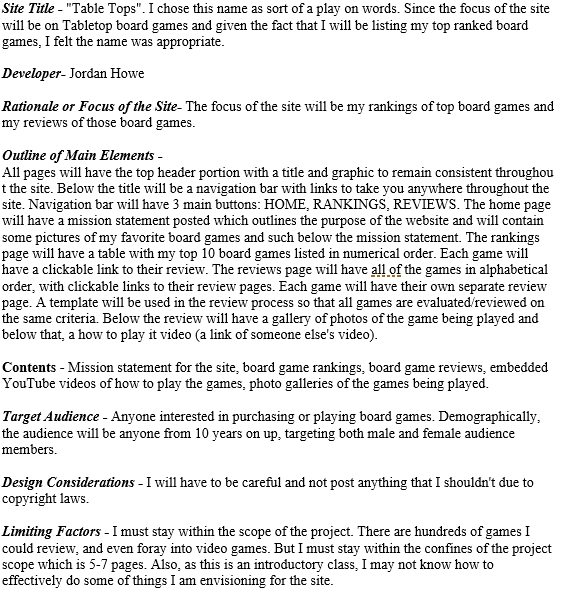
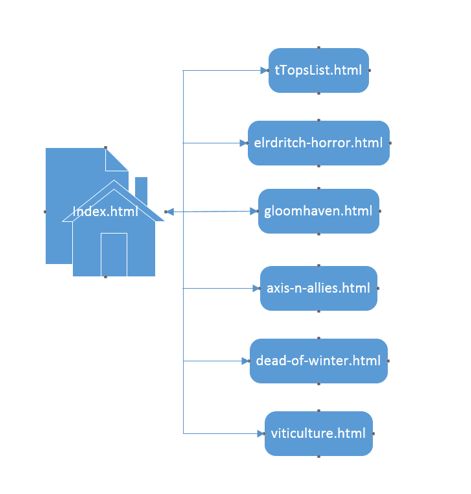
Hello everyone! I’ve created my site diagram and now its on to the week 3 milestone. You’ll see below, my cumulative progress thus far.
Week 1: Proposal
Week 2: Site Diagram
Course Project Week 3
Project Milestone 3: Page Layout and Site Navigation
This week’s milestone is two parts really. First, I must create a detailed page layout diagram using Visio. This template will be used for all the pages on the site. The diagram must include the following 4 elements:
- Header area
- Link area
- Main content area
- Footer area
And secondly, I must create blank content pages per my site diagram. For this task I need to do the following:
- Create each of the pages
- Create the navigational links between the pages
- Placeholder elements for future content using the box model with div tags and CSS
Essentially, I am creating the skeleton for my site. This approach is intuitive for me, I like to build the structure then fill in the content with any project that I am doing.
This week’s approach
I will be checking out various popular websites to see how they are structured so that I can use one of them as a model for my own. As I am analyzing these sites, I will also be looking for color schemes that I like as well. Its obviously important that I make this my own website design but I feel that due to my lack of experience in web design that it would be advantageous of me to identify and understand what works in terms of web design. More to follow on my update post later this week.
 Jordan's CIS363 Course Blog